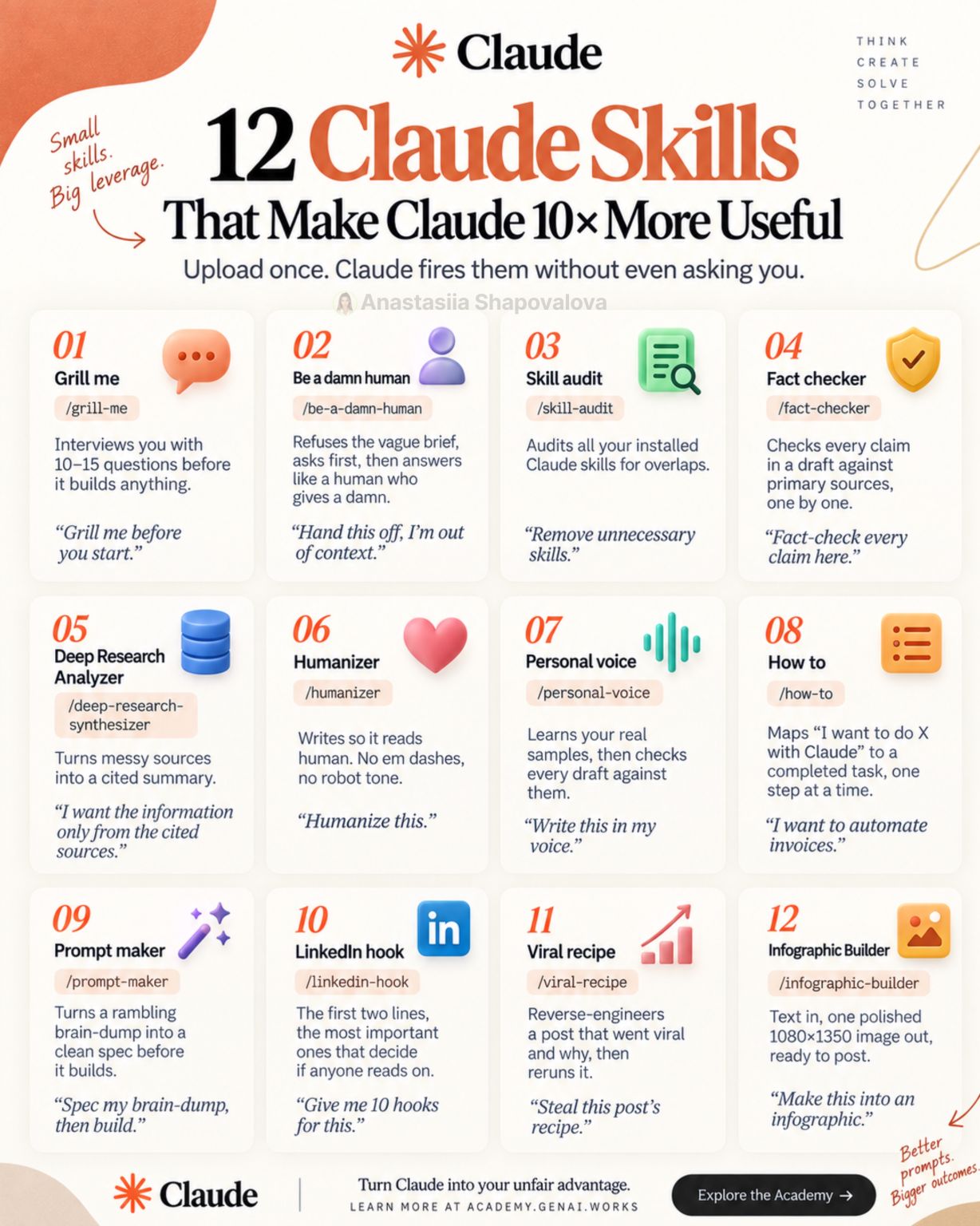
Someone dropped a nicely designed infographic in my feed last week: twelve Claude skills that supposedly make Claude “10x more useful.” Grill me. Humanizer. Fact checker. Prompt maker. The usual shape of these lists, one card each, a slash command, a sample prompt.
My first reaction was the one I have to most productivity lists, which is that twelve of anything is eleven too many. But I installed most of them anyway, used them for a couple of weeks inside real work, and the honest result is more interesting than either “all hype” or “10x.” Three of them genuinely changed how I work. A few are fine. The rest I’ve already stopped reaching for.
Before the sorting, though, it’s worth being clear about what a skill actually is, because the infographic format hides it.
A skill is a folder, not a feature
A Claude skill is a directory with a SKILL.md file in it. That file has a bit of frontmatter, a name and a description, and then a body of instructions. That’s the whole thing. It can also carry supporting files: scripts, reference docs, templates.
The part that matters is the description. Claude reads the descriptions of every installed skill, and when a task looks like something a skill covers, it loads that skill’s instructions into the conversation and follows them. You don’t have to invoke it. You can, by typing the slash command, but the design intent is that it fires on its own when the work matches.
So a skill is not a prompt you paste. It’s a prompt you stop having to remember. That distinction is the entire value proposition, and it’s why “12 skills” is a slightly misleading unit of measurement. The number of skills you have installed doesn’t matter. What matters is whether their descriptions fire at the right moment, and whether their instructions are better than what Claude would have done anyway.
That’s the test I ended up applying to all twelve.
The three that earned their slot
Interrogate me before you build. The infographic calls this one “Grill me,” and it’s the one I expected to find annoying. It makes Claude ask ten to fifteen questions before it writes anything. In practice it’s the single highest-leverage thing on the list, and the reason is not subtle: most of my bad AI output has come from a vague brief, not from a bad model. I ask for “a script that checks the staging environment,” get something plausible, and then spend twenty minutes explaining what I actually meant. The questions front-load that twenty minutes and cut it to five.
The catch is that it’s genuinely irritating for small tasks, which is why it should be a skill you invoke rather than one that fires automatically. Fifteen questions before a one-line fix is a worse experience than just getting the one-line fix wrong twice.
Check every claim against a source. This is the “Fact checker” card, and it’s the one I’d put first if I were rewriting the list. Take a draft, split it into individual factual claims, then check each claim against a primary source one at a time. The reason it works isn’t that Claude suddenly knows more. It’s that claim-by-claim verification is a different task from writing, and separating the two catches things that a single pass never does. I’ve had it flag a version number I’d carried forward from an older post, and a statistic I’d half-remembered from a conference talk that turned out to be from a vendor’s marketing page.
If you write anything that other people act on, this is the skill to install. It’s also the one with the clearest QA parallel: it’s a review pass, not a generation pass, and the whole reason code review works is that reviewing and writing are different jobs.
Turn the brain-dump into a spec. “Prompt maker” on the card. You paste an unstructured ramble about what you want, and you get back a clean specification before anything gets built. What I like about it is that it produces an artifact I can actually correct. Fixing a spec is cheap. Fixing a finished implementation built from a misread spec is not. It’s the same argument as writing acceptance criteria before the sprint instead of arguing about “done” after it.
The ones that are fine
“How to” maps a goal like “I want to automate invoices” to a completed task, one step at a time. Useful if you’re new to a tool, mostly redundant once you know it.
“Deep research synthesizer” turns messy sources into a cited summary and constrains the output to those sources. That constraint is the good part. The summarizing was never the hard bit.
“Skill audit” scans your installed skills for overlaps. Which is a fairly loud admission, built into the list itself, that people end up installing too many of these. It’s a useful tool and also an argument against the premise.
The ones I stopped using
“Humanizer” and “Be a damn human” are both aimed at tone, and they mostly work by forbidding tells: no em dashes, no robot cadence. I understand the appeal. But a skill that strips surface markers of AI writing doesn’t make the writing yours, it makes it unmarked, which is a different and much smaller thing. If the underlying draft has nothing specific in it, no anecdote, no number you actually measured, no opinion you’d defend in a meeting, removing the em dashes doesn’t rescue it.
“Personal voice” is the more honest version of this. It learns from real samples of your writing and checks drafts against them. That’s a better mechanism, because it has something concrete to compare against. It still only works if you feed it writing that had a voice to begin with.
The LinkedIn hook, viral recipe, and infographic builder skills are all doing the same job, which is packaging. They’re good at it. I just don’t have that job very often, and neither do most engineers.
What I’d actually tell you to do
Install two. Use them for a month. Write the third one yourself.
That last part is the real unlock, and it’s the part these lists never say, because a list of twelve things you can download is a better post than “go write your own.” A skill is a markdown file. The highest-value skill you can have is the one that encodes a workflow specific to you: your team’s PR description format, the checklist you run before a release, the way your test IDs are named, the questions your staff engineer always asks in review. Nobody else can publish that one. It fires automatically once it exists, and it saves you the thing that actually costs you time, which is re-explaining your own context every single session.
Twelve skills from a stranger’s infographic will make Claude somewhat more useful. One skill that encodes how your team actually works will do more than all twelve.
The infographic that prompted this is by Anastasiia Shapovalova, via academy.genai.works. The sorting, and the complaints, are mine.